Billing Email Examples for Invoices, Payments & Reminders
A billing email shares invoice details, payment requests, or billing updates. Explore 10 copy-ready examples, subject lines, and customizable templates.

Md. Yaikub Hossain Razon
A billing email is a message that tells a customer what they owe, what they have paid, or what has changed in their billing account. Whether you are sending your first invoice, following up on a late payment, or confirming a subscription charge, the email should make the next step clear.
This guide includes 10 original, copy-ready billing email examples for agencies, freelancers, SaaS businesses, and finance teams. You will also find subject lines, a billing communication workflow, and an HTML example you can customize with MailEditor.
What is a billing email?
A billing email communicates a financial event or obligation between a business and its customer. It may deliver an invoice, request payment, confirm a completed charge, explain a billing adjustment, or ask the customer to update a payment method. Unlike promotional emails, its primary purpose is to communicate accurate account information and help the recipient complete a specific task.
The email is not always the invoice itself. An invoice is a record of a charge, while the email delivers that record or explains its status. A receipt confirms a payment that has been received. Keeping these distinctions clear prevents customers from mistaking a payment confirmation for another request to pay.
Types of billing emails
Choose your message by the customer’s actual billing status. A customer who has paid should receive a confirmation, not a reminder.
| Email type | When to use it | Primary action |
|---|---|---|
| Invoice delivery | New amount due | View or pay invoice |
| Upcoming payment reminder | Unpaid invoice approaching due date | Review invoice |
| Overdue notice | Payment past agreed deadline | Pay or discuss resolution |
| Payment confirmation | Payment received | View receipt |
| Failed payment | Charge did not complete | Update payment method |
| Recurring billing notice | Upcoming subscription charge | Review billing details |
| Billing adjustment | Charge or credit corrected | Review revised statement |
| Refund confirmation | Refund initiated or completed | View refund details |
What to include
Use these six elements as a checklist. Not every email needs an amount due or a payment button; choose the fields that reflect its purpose.
Business name and billing contact
Invoice reference or payment status
Amount, currency, date and reference
Service, subscription or adjustment
Pay, view, update or review
A monitored reply address or help link
For invoices, include the relevant billing period or work description and make the full invoice available as an attachment or through a secure portal. If you accept several currencies, show the currency explicitly rather than relying on a dollar sign. For a completed payment, state whether the full balance or only part of it was paid.
10 copy-ready examples
The following examples use fictional placeholders. Replace every bracketed field with your actual billing records and use verified payment links. A CTA below indicates the action to link in your email, not a working payment button.
1. New invoice email
Best for: Freelancers and service businesses
Subject: Invoice [Number] for [Project]
Preheader: Your invoice of [Amount] is due [Date].
Hi [Client Name],
Thank you for working with us on [Project]. Invoice [Number] for [Amount and Currency] is ready for your review. It covers [Work or Billing Period] and is due on [Date].
You can view the invoice and payment instructions using the link below. Please reply if any details need clarification.
Thank you,
[Name / Company]
Customization tip: Include a purchase order reference if the client requires one. Do not assume payment terms that were not agreed.
2. Recurring monthly billing email
Best for: Agencies and subscription services
Subject: Your [Month] invoice from [Company]
Preheader: Review your charges for [Billing Period].
Hi [Name],
Your invoice for [Service] covering [Start Date] to [End Date] is available.
Invoice: [Number]
Total: [Amount and Currency]
Due: [Date]
Please review the statement in your billing portal. If you use automatic payments, your payment schedule is shown there. Otherwise, follow the payment instructions on the invoice.
[Billing Team]
Customization tip: State whether the customer needs to pay manually or has an automatic payment arrangement.
3. Friendly payment reminder
Best for: Customers with unpaid invoices before the due date
Subject: A reminder: Invoice [Number] is due [Date]
Preheader: Here are your invoice details and payment options.
Hi [Name],
A quick reminder that invoice [Number] for [Amount and Currency] is due on [Date]. You can review the invoice and arrange payment through the link below.
If payment is already in progress, thank you. Please let us know if you need a copy of the invoice or assistance with the payment process.
Best,
[Name]
Customization tip: Check the ledger immediately before sending. Suppress reminders for settled or disputed invoices.
4. Overdue payment follow-up
Best for: Unpaid invoices after the agreed due date
Subject: Follow-up on outstanding invoice [Number]
Preheader: Please review the remaining balance and payment options.
Hi [Name],
Our records show that invoice [Number], due on [Date], has an outstanding balance of [Amount and Currency].
Could you confirm when payment is expected? You can review the invoice and payment options below. If there is a discrepancy or a payment is already on its way, please reply so we can reconcile our records.
Thank you,
[Billing Team]
Customization tip: Keep the message factual. Mention fees or collection steps only if applicable under the agreement and relevant law.
5. Payment confirmation email
Best for: Customers who have completed a payment
Subject: Payment received: [Invoice Number]
Preheader: Your payment of [Amount] has been recorded.
Hi [Name],
Thank you for your payment. We have received [Amount and Currency] on [Payment Date] for invoice [Number].
Payment reference: [Reference]
Remaining balance: [Balance and Currency]
Your receipt is available below. If you have questions about your account, contact [Billing Contact].
[Company]
Customization tip: Use the remaining balance from your records. Only say “paid in full” when the entire invoice is settled.
6. Failed payment email
Best for: Subscription customers whose automatic charge failed
Subject: Please update your payment details for [Service]
Preheader: Your recent payment could not be completed.
Hi [Name],
We could not complete your scheduled payment of [Amount and Currency] for [Service] on [Date].
Please sign in to your billing portal to review your payment method and complete the payment if required. Your account page shows the current balance and any applicable retry schedule.
If you have already resolved the issue, no further action is needed.
[Billing Support]
Customization tip: Do not speculate about why a card failed. Never ask for full card details, PINs, or passwords by email.
7. Upcoming subscription renewal email
Best for: SaaS and membership businesses
Subject: Your [Plan] renews on [Date]
Preheader: Review your upcoming charge and subscription details.
Hi [Name],
Your [Plan] subscription is scheduled to renew on [Date]. Your upcoming charge is [Amount and Currency] for [Billing Period].
Review your plan, payment method, and available subscription options in your account before the renewal date.
If you need help, our billing team is available at [Contact].
[Company]
Customization tip: Use the actual renewal price and terms. Include required notices and cancellation options where applicable.
8. Billing correction email
Best for: Customers affected by an invoice discrepancy
Subject: Updated invoice [Number]: billing correction
Preheader: Please review the corrected amount and details.
Hi [Name],
We have corrected invoice [Number] to reflect [Brief Reason]. The revised total is [Amount and Currency], compared with the previous total of [Previous Amount and Currency].
[Explain any credit, outstanding balance, or revised due date accurately.]
Please use the updated invoice below for your records. We apologize for any confusion and are available to answer questions.
[Billing Team]
Customization tip: Clarify whether the original invoice has been superseded or a separate credit note was issued.
9. Refund confirmation email
Best for: Customers receiving a full or partial refund
Subject: Refund update for [Order or Invoice Number]
Preheader: Your refund of [Amount] has been [Status].
Hi [Name],
Your refund of [Amount and Currency] for [Order or Invoice Number] has been [Initiated or Completed] on [Date].
Refund reference: [Reference]
Refund method: [Safe Method Description]
If the refund is still processing, the time it takes to appear may depend on your payment provider. You can view the current status below.
[Customer Support]
Customization tip: Distinguish a refund initiation from a completed refund. Do not promise an arrival date you cannot guarantee.
10. Billing statement email
Best for: Business customers with multiple invoices
Subject: Your account statement for [Month]
Preheader: Review invoices, payments and the outstanding balance.
Hi [Name],
Your account statement for [Period] is ready. It summarizes invoices, recorded payments, credits and any outstanding balances.
Total outstanding: [Amount and Currency]
Statement date: [Date]
Please review the statement in your billing portal and contact us if your records differ. Individual invoice due dates are shown in the statement.
[Finance Team]
Customization tip: A statement is not automatically a new invoice. Make the individual due dates and payment references clear.
Subject lines and preheaders
Use the subject to identify the billing event and the preheader to supply a useful detail. Avoid putting confidential account information or full payment identifiers in the subject line, where it may appear on a lock screen.
| Purpose | Subject line | Preheader |
|---|---|---|
| New invoice email | Invoice [Number] for [Project] | Your invoice of [Amount] is due [Date]. |
| Recurring monthly billing email | Your [Month] invoice from [Company] | Review your charges for [Billing Period]. |
| Friendly payment reminder | A reminder: Invoice [Number] is due [Date] | Here are your invoice details and payment options. |
| Overdue payment follow-up | Follow-up on outstanding invoice [Number] | Please review the remaining balance and payment options. |
| Payment confirmation email | Payment received: [Invoice Number] | Your payment of [Amount] has been recorded. |
| Failed payment email | Please update your payment details for [Service] | Your recent payment could not be completed. |
| Upcoming subscription renewal email | Your [Plan] renews on [Date] | Review your upcoming charge and subscription details. |
| Billing correction email | Updated invoice [Number]: billing correction | Please review the corrected amount and details. |
| Refund confirmation email | Refund update for [Order or Invoice Number] | Your refund of [Amount] has been [Status]. |
| Billing statement email | Your account statement for [Month] | Review invoices, payments and the outstanding balance. |
Billing Email Templates You Can Customize
When billing information includes several fields, a structured visual layout can be easier to review than a long plain-text message. Choose a billing email template that matches the purpose of your message, then customize the branding, amounts, dates and payment instructions.
1. Billing Email Template
Best for: Agencies, freelancers, consultants and service providers.
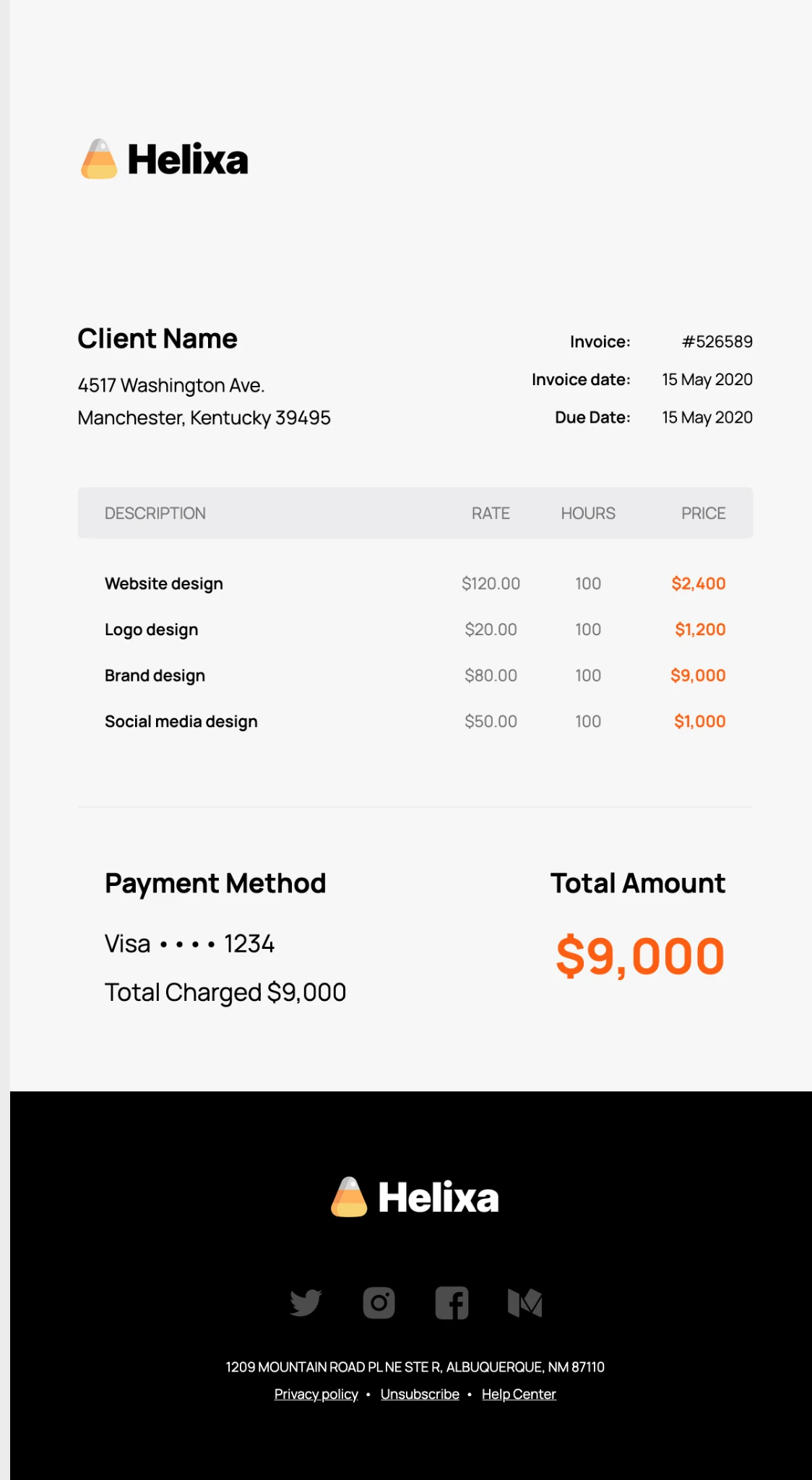
Use this layout to organize client details, invoice dates, service line items, rates, hours and totals. Update the billing information and connect the relevant payment action.
2. Simple Billing Email Template
Best for: Small businesses and straightforward client billing.
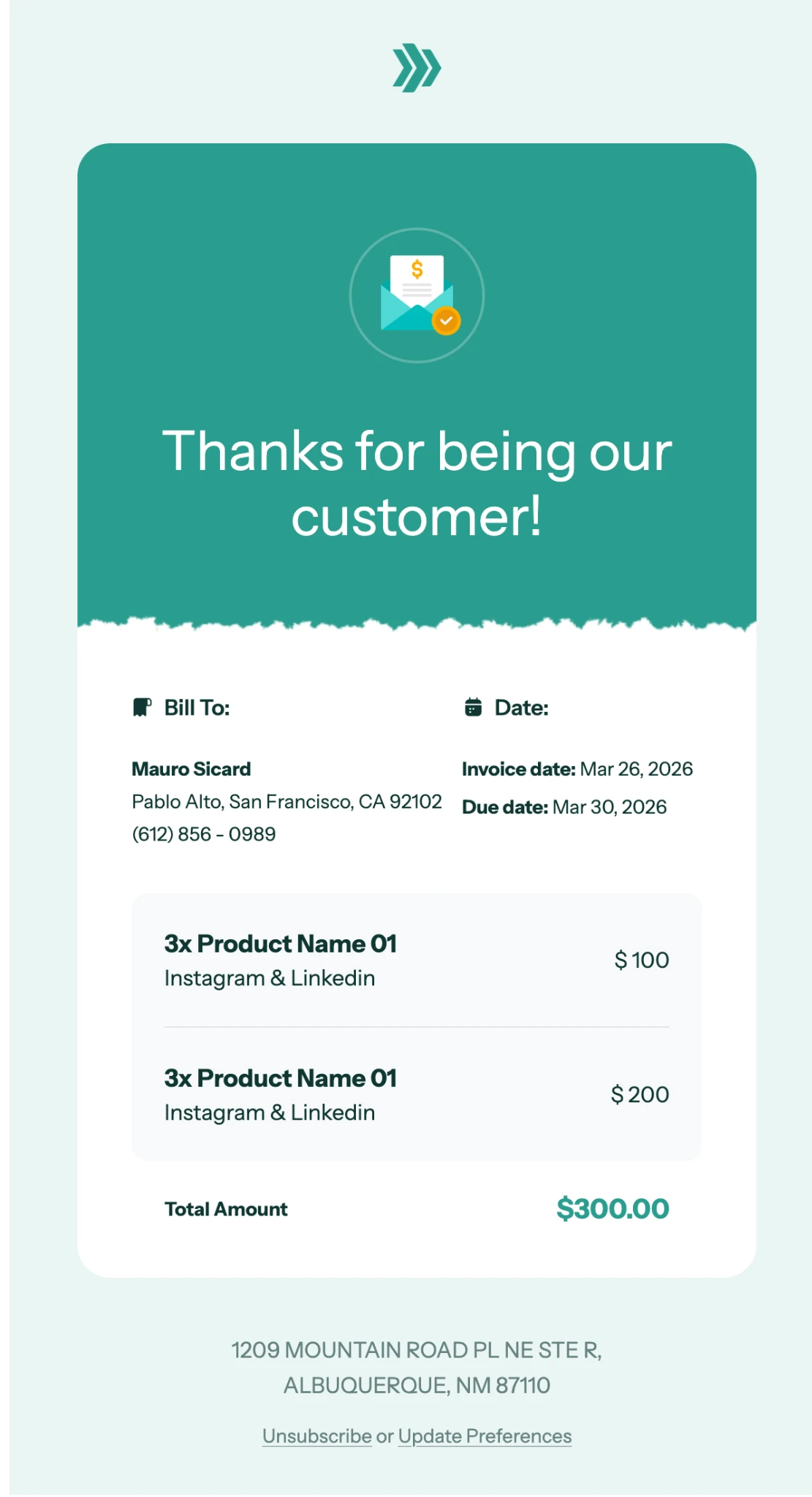
Choose a simple layout when customers need to review a charge and find the next step quickly. Keep the invoice reference, amount, due date and payment instructions easy to locate.
3. Billing Statement Email Template
Best for: Monthly statements, SaaS businesses and recurring billing.
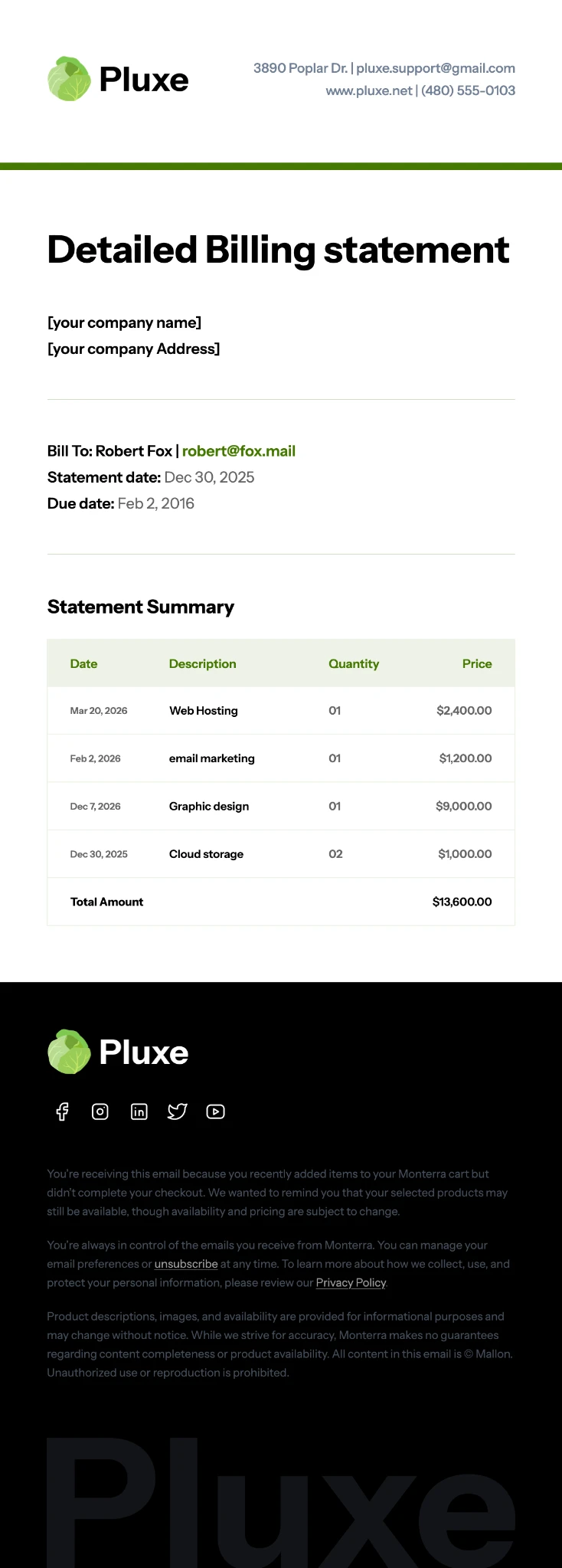
Adapt this design for periodic billing summaries. Include the statement period, relevant account activity and current balance, and direct customers to their account or billing portal when appropriate.
Browse more designs in the billing email templates collection or explore invoice email templates for additional layouts.
Export the finished HTML to your sending platform and connect your real invoice data there. The design itself does not process payments or reconcile accounts.
Billing email workflow
A useful billing sequence follows the status of the invoice rather than sending the same reminder to everyone. This example schedule is illustrative; use your actual payment terms and customer agreements.
Send accurate charges and due date.
Remind only if unpaid and appropriate.
Check status; follow up on outstanding balance.
Stop reminders and send confirmation.
If a customer disputes a charge, route the case to billing support instead of continuing automatic reminders. If an automatic payment fails, use a separate payment-method update flow. A partial payment should update the remaining balance rather than mark the entire invoice paid.
HTML billing email example
The following table-based HTML example is suitable as a starting point for invoice delivery. Replace the tokens with real data and use your sending platform’s supported merge tags. The CTA must point to a secure, authorized invoice page.
For structured invoice details, use real table headers and readable cell spacing. See our email pre-send checklist before activating an automated billing workflow.
Best practices
- Reconcile before sending. Check invoice status, amount, currency, credits and due date against your billing records.
- Keep the action relevant. Use View Invoice for invoice delivery, View Receipt for payment confirmation and Manage Subscription for renewal notices.
- Use secure destinations. Link to your trusted billing domain and never request sensitive payment credentials in email.
- Avoid duplicate requests. Suppress paid invoices and avoid reminders for accounts under active dispute.
- Make the design accessible. Use readable text, sufficient contrast and descriptive buttons; do not hide key amounts inside images.
- Use a monitored sender. Give customers a clear way to reach billing support.
- Test automation edge cases. Check partial payments, refunds, multiple currencies, failed charges and missing merge fields.
- Keep transactional content focused. Do not add unrelated promotions that distract from the billing purpose; follow applicable messaging requirements.
A consistent footer helps customers identify the sender and find support. For layout ideas, see our email footer examples. Adapt the footer to your transactional purpose rather than copying marketing subscription controls without considering the message type.
Final Answer
A professional billing email clearly explains the billing event, identifies the relevant invoice or account, states the correct amount and status, and offers one appropriate next step. Send invoice requests only when payment is due, send confirmations when payments are recorded, and use account-update notices when billing information changes. For a branded visual layout, customize MailEditor’s billing email template and connect it to your real billing records in your sending platform.
Frequently Asked Questions
Popular Blogs
Email Design2 mins to read
Top Email Template Builders & HTML Email Editors for 2026
Compare the best email template builders and HTML editors to design professional, responsive campaigns without coding.

Email Design9 mins to read
Email Signature Size and Image Best Practices
The ideal email signature is 320–600px wide and 90–200px high. Learn the best image sizes, formats, file limits, and mobile-friendly design tips.

Email Tips7 mins to read
Best Drag and Drop Email Editors in 2026
Discover the best drag and drop email editors in 2026. Compare top tools, features, templates, pricing, and automation to build stunning emails fast.
Marketing7 mins to read
4 Best Unlayer Alternatives to Design Emails
Looking for Unlayer alternatives? Explore the 4 best email design tools to create beautiful, responsive emails faster and easier.
Marketing6 mins to read
5 Beefree Alternatives to Upgrade Email Design Workflows
Looking for a better email design tool? Explore 5 Beefree alternatives that streamline workflows, improve collaboration, and elevate email campaigns.