Banking Email Examples: Alerts, Updates & Customer Messages
Banking email examples cover account alerts, statements, card updates, and customer notices. Explore 10 copy-ready messages, subject lines, and templates.

Md. Yaikub Hossain Razon
Banking email examples help banks, credit unions, and fintech teams communicate clearly about account activity, statements, card updates, service changes, and customer onboarding. A useful email explains the verified event, gives only the information the customer needs, and provides a safe next step.
This guide includes 10 complete, copy-ready banking email examples, subject lines and preheaders, practical customization tips, and three editable MailEditor designs. It focuses on messages sent from a financial institution to its customers, rather than emails customers write to a bank.
What Are Banking Emails?
A banking email is a message a financial institution sends to a customer about a genuine account, transaction, card, application, security, or service event. Some banking emails are operational notifications; others introduce a service or help new customers get started. The content should match the customer’s actual situation.
Unlike a payment-request email from a merchant, a bank account alert should not look like an invoice or demand immediate payment. For merchant invoices, reminders, and payment receipts, see our billing email examples guide. This article focuses on bank-to-customer communication.
Introduce digital banking and first steps after onboarding.
Share verified statements, balances and account activity.
Explain card and account security events without pressure.
Communicate service availability or application status.
What Should a Banking Email Include?
The details depend on the message. A statement notification should say which statement is ready; a card notice should explain the verified card status; and a security alert should give a calm, safe way to review the event. These six elements work as a practical checklist.
- Recognizable sender: The approved bank name and genuine sender identity.
- Specific subject line: State whether the email is an account update, statement, card notice, or security event.
- Supporting preheader: Add useful context without including confidential account data.
- Verified facts: Correct dates, status, masked references, and timezone where relevant.
- One safe next step: Review in the official banking app or a customer-known, secure account area.
- Support and disclosures: Use institution-approved contact information, footer, and required notices.
Before you copy: Every email below is original sample copy, not a message from a real bank. Replace bracketed fields with verified account or service data, follow your institution’s approval process, and never request passwords, PINs, one-time codes, or full card numbers by email.
10 Banking Email Examples You Can Copy
These examples cover different customer needs instead of repeating the same notification with small wording changes. Each includes a subject line, preheader, complete email body, suggested CTA text, and a customization tip. Suggested CTAs are labels only, not live bank links.
1. New Customer Welcome Email
Best for: New customers who have completed registration and can access the bank’s digital services
Subject: Welcome to [Bank Name], [First Name]
Preheader: Your digital banking guide and support options are ready.
Hi [First Name],
Welcome to [Bank Name]. We are pleased to help you get started with your banking services.
You can now open the official [Bank Name] app or visit our website using the address you already know. From your account area, you can review the services available to you, choose your alert preferences, and find answers to common questions.
If there are additional steps to complete your account setup, we will explain them in your secure banking dashboard. You do not need to send account passwords or verification codes by email.
We look forward to supporting you. For assistance, please use [Official Support Channel].
Warm regards,
[Bank Name] Customer Experience Team
Sample action label. Connect only to a verified, authorized banking destination.
Customization tip: Only send after the customer’s actual onboarding milestone. Replace general benefits with the services genuinely enabled for that account.
2. Bank Account Opening Confirmation Email
Best for: Customers whose new account has been approved and opened
Subject: Your [Account Type] account is now open
Preheader: Your account information and next steps are available securely.
Hello [First Name],
We are writing to confirm that your [Account Type] account with [Bank Name] was opened on [Opening Date].
Account reference: Ending in [Last Four Digits]
Account status: Open
You can review your account details, services, applicable terms, and any remaining setup steps in your secure banking portal. For your protection, this email does not include your full account number or access credentials.
If you did not apply for this account, contact us through the phone number on our official website or another trusted support channel.
Thank you for choosing [Bank Name].
[Bank Name] Account Services
Sample action label. Connect only to a verified, authorized banking destination.
Customization tip: Use an approved status event from the core banking system. Never turn an application acknowledgement into an account-opening confirmation.
3. Monthly Account Statement Notification
Best for: Customers whose account statements have been published
Subject: Your [Month] bank statement is available
Preheader: Review activity for the period [Start Date] to [End Date].
Hi [First Name],
Your [Account Type] statement for [Statement Period] is now available in online banking.
The statement includes recorded activity for that period, applicable account information, and any notices associated with your account. To read or download it, sign in through the official [Bank Name] app or your bookmarked banking website and select Statements.
If you see an entry you do not recognize, please contact [Official Support Channel] using the details you already trust.
Thank you,
[Bank Name] Statements Team
Sample action label. Connect only to a verified, authorized banking destination.
Customization tip: Match the period to the actual statement, and specify the correct account type. Avoid attaching sensitive statements unless your approved delivery policy allows it.
4. Transaction or Account Activity Alert Email
Best for: Customers enrolled in transaction alerts after a verified account event
Subject: New activity on your account ending in [Last Four]
Preheader: Review a [Transaction Type] recorded on [Date].
Hello [First Name],
We recorded [Transaction Type] activity for your account ending in [Last Four Digits] on [Date and Time, Timezone].
Activity: [Verified Short Description]
Amount: [Amount and Currency, if permitted]
Status: [Posted or Pending, as verified]
You can find the full details in your recent activity after opening the official [Bank Name] app. If you recognize this activity, no response is needed.
If it looks unfamiliar, contact the bank directly using a trusted number or the secure support feature in your app. Please do not reply with your account information.
Regards,
[Bank Name] Account Alerts
Sample action label. Connect only to a verified, authorized banking destination.
Customization tip: Distinguish pending authorizations from posted transactions, and honor each customer’s notification preferences and privacy settings.
5. Low-Balance Notification Email
Best for: Customers who opted into a low-balance or threshold alert
Subject: Balance alert for account ending in [Last Four]
Preheader: Your available balance is below your selected threshold.
Hi [First Name],
This is an alert you requested for the account ending in [Last Four Digits]. Your available balance is now below your selected threshold of [Threshold and Currency], based on the latest confirmed account information at [Time, Timezone].
For the current balance and recent account activity, please open your official banking app. You can also adjust or disable this alert in your secure notification settings.
Any account-specific fees, overdraft features, or transaction limits are described in your account agreement and online banking information.
Best regards,
[Bank Name] Account Notifications
Sample action label. Connect only to a verified, authorized banking destination.
Customization tip: Do not imply a fee has been charged unless the account ledger confirms it. Make it clear that balances may change after the alert is generated.
6. Debit or Credit Card Expiry Notice
Best for: Cardholders with a verified upcoming expiry date
Subject: An update about your card ending in [Last Four]
Preheader: Check the renewal details for your card expiring [Month].
Hello [First Name],
Our records show that your [Debit or Credit] card ending in [Last Four Digits] is scheduled to expire in [Month and Year].
Please review the Card Management area of your official [Bank Name] app to see the renewal status and whether you need to take any action. If an address or contact detail requires updating, use your secure account settings or an approved support channel.
We will provide further information according to the actual terms and replacement process for your card program. You do not need to send card numbers, PINs, or security codes in a reply.
Thank you,
[Bank Name] Card Services
Sample action label. Connect only to a verified, authorized banking destination.
Customization tip: Confirm whether cards are automatically renewed, if delivery is available, and whether activation is required before promising those steps.
7. Replacement Card Status Update Email
Best for: Customers who requested a new or replacement card
Subject: Your replacement card status has changed
Preheader: See the latest verified status in Card Management.
Hi [First Name],
Here is an update on the [New or Replacement] card requested for your account ending in [Last Four Digits].
Current status: [Verified Card Status]
Request reference: [Masked Reference]
Last updated: [Date]
You can view any available delivery information, activation guidance, or next steps in the Card Management section of your official [Bank Name] app. Available options depend on your card program.
If you did not request a card, please contact us directly using the number on your existing card or another known support channel.
Sincerely,
[Bank Name] Card Support
Sample action label. Connect only to a verified, authorized banking destination.
Customization tip: Do not invent shipment tracking, estimated delivery, or activation details. Send the specific status your system actually records.
8. New Sign-In Security Notification Email
Best for: Verified sign-in events that meet the institution’s alert rules
Subject: New sign-in detected for your [Bank Name] account
Preheader: Check the date and device details through your bank app.
Hello [First Name],
A new sign-in was recorded on your [Bank Name] account on [Date] at [Time and Timezone].
Device or browser: [Verified General Description]
Approximate location: [Location, only if reliable and permitted]
If this was you, no additional action may be needed. If you do not recognize the activity, open the official [Bank Name] app independently or call the support number printed on your card. Follow the security instructions offered through those trusted channels.
For your security, do not email your password, PIN, or one-time verification code to anyone.
[Bank Name] Security Team
Sample action label. Connect only to a verified, authorized banking destination.
Customization tip: Use the actual sign-in event and approved response policy. Avoid frightening countdowns and any link that asks recipients to enter credentials unexpectedly.
9. Scheduled Online Banking Maintenance Email
Best for: Customers affected by planned digital banking maintenance
Subject: Scheduled [Bank Name] service maintenance: [Date]
Preheader: Review the affected services and planned time window.
Hi [First Name],
We are planning maintenance for [Service Name] on [Date], from [Start Time] to [End Time] [Timezone].
During this period, [Verified List of Affected Features] may be temporarily unavailable. Other services are expected to remain available unless we communicate an additional change.
Please plan any time-sensitive activity accordingly. You can find the latest service information in the official app or the bank’s service-status page, accessed through the website you normally use.
Thank you for your understanding.
[Bank Name] Service Operations
Sample action label. Connect only to a verified, authorized banking destination.
Customization tip: Specify the timezone, affected regions, and whether the window is an estimate. Update customers if the schedule changes.
10. Loan Application Status Update Email
Best for: Applicants whose lending application has reached a verified stage
Subject: Your [Loan Type] application has an update
Preheader: Check the latest application status securely.
Hello [First Name],
There has been an update to your [Loan Type] application submitted on [Application Date].
You can review the current application status and any next steps in the secure application area of the official [Bank Name] website or app. If supporting documents are needed, the approved portal will provide the details and any applicable deadline.
For privacy and accuracy, we have not included confidential decision information or sensitive document requests in this email.
If you have questions about the process, please contact [Official Lending Support Channel] through a verified route.
Kind regards,
[Bank Name] Lending Team
Sample action label. Connect only to a verified, authorized banking destination.
Customization tip: Do not say approved, rejected, funded, or guaranteed unless the actual application status and compliance-approved wording support it.
Banking Email Subject Lines and Preheaders
A clear subject names the event; the preheader adds the next useful detail. Keep private data out of both, because they may appear on lock screens or shared devices. For writing guidance, read email preheader best practices.
| Purpose | Subject line | Preheader |
|---|---|---|
| Welcome | Welcome to [Bank Name] | Find your first steps and official support channels. |
| Account opening | Your [Account Type] account is now open | Review your account details through online banking. |
| Monthly statement | Your [Month] statement is ready | Access the statement period in your secure account. |
| Activity alert | New activity on your account | Review the latest recorded transaction details. |
| Low balance | Your selected balance alert was triggered | Check recent account activity and your available balance. |
| Card expiry | A card update from [Bank Name] | See the next steps for your card ending in [Last Four]. |
| Replacement card | Your replacement card status has changed | Check the latest confirmed status in your banking app. |
| Security notice | New sign-in detected on your account | Review date and device details in the official app. |
| Maintenance | Scheduled online banking maintenance on [Date] | See which services may be affected and for how long. |
| Loan application | An update to your [Loan Type] application | Check your current application status securely. |
| Profile update | Your contact information was updated | Review the change in your account settings. |
| Service notice | An update about [Bank Name] services | Here is what customers need to know about the change. |
For security messages, avoid manufactured urgency and do not ask customers to disclose a password, one-time code, or payment-card security number. Actual inbox preview lengths differ by device and email client.
3 Banking Email Templates You Can Customize in MailEditor
The messages above provide copy-ready text. When you need a visual email, these three actual MailEditor designs offer starting points for onboarding, account summaries, and fintech updates. The original template previews below are displayed full length, without cropping or scrolling.
1. Welcome Email Template for Digital Banking
Best for: Digital banking welcome campaigns, customer introduction, and first-step guidance.

A green, banking-focused layout for introducing an institution and guiding a new customer toward the next useful step. Match the visible copy to the services actually available to that customer.
Before editing: Replace the sample bank branding, welcome message, account-setup language, images, and CTA destination. Do not suggest an account is active unless it has been confirmed.
2. Banking Email Template
Best for: Account information summaries, card-service messages, and customer account communication.
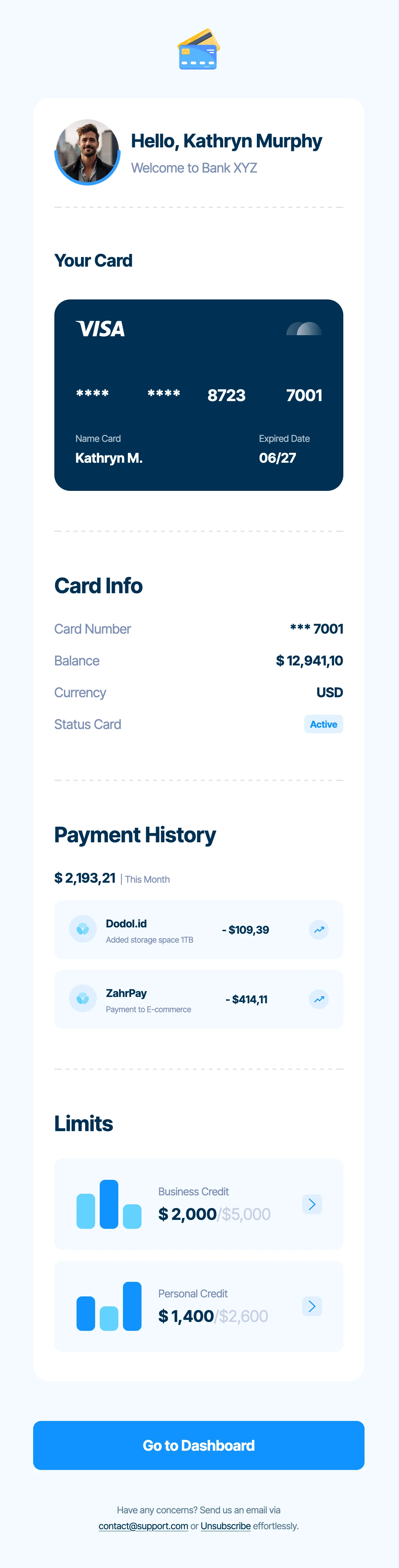
A clean layout with structured account-related information. It is useful when customers need to scan a short overview and understand what action is available next.
Before editing: Replace sample balances, masked card information, transaction entries, and customer details with verified data. Remove every element your institution does not approve for delivery by email.
3. Finance Email Template for Banking and Fintech Account Updates
Best for: Fintech service notifications, account activity summaries, and feature or service updates.
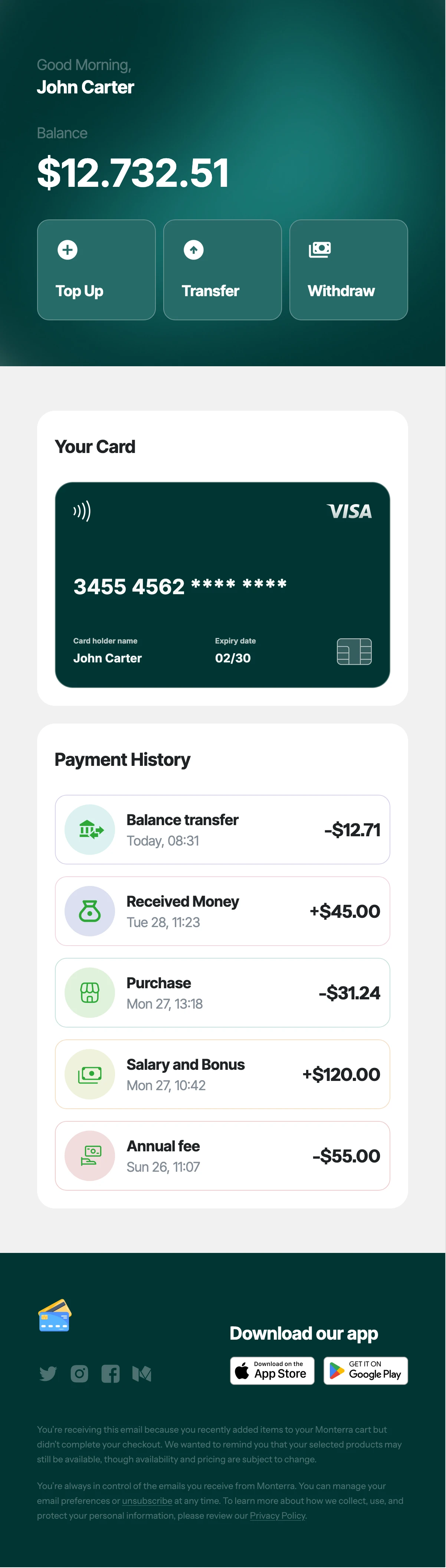
A dashboard-style financial email design with account-oriented sections and quick actions. Adapt it for a genuine customer update rather than showing unrelated sample services or balances.
Before editing: Verify the service descriptions, transaction data, privacy controls, and links. Remove sample top-up, transfer, or withdrawal actions if they are not applicable.
To compare more financial-service designs, browse MailEditor’s Banking Email Templates collection. Choose the layout based on the customer’s actual message, not just its colors.
How to Customize a Banking Email Template
With MailEditor’s email editor, you can adjust the visual layout without rebuilding a message from raw HTML. For real banking communication, the approved content, customer-event trigger, and secure sending destination are just as important as the design.
- Choose the verified event. Decide whether this is a welcome message, completed account opening, statement notice, card update, security alert, or service change.
- Open the appropriate template. Select one of the three designs above or compare the banking collection.
- Replace every placeholder. Update the institution name, approved logo, message, dates, masked account identifiers, and footer information.
- Minimize private information. Use only the fields authorized for email delivery. Never insert passwords, PINs, full card numbers, or one-time codes.
- Set a safe CTA. Connect actions to your institution’s verified secure account experience or instruct readers to open their known banking app independently.
- Review and test. Confirm the event status, recipient data, links, alt text, desktop/mobile rendering, support details, and delivery workflow.
Before sending, use the MailEditor email pre-send checklist to review copy, images, links, responsive layout, and the required customer details.
Start with an editable design, replace the sample information, and prepare your message for a verified, secure sending workflow.
Browse Banking Templates →Open MailEditorBanking Email Best Practices
- Send only verified updates. Confirm each account, card, statement, transaction, sign-in, or loan status before the email is triggered.
- Make the subject specific. Say what changed without putting private account details into the inbox preview.
- Use recognizable identity. Follow your institution’s approved sender, authentication, domain, and brand policies.
- Minimize financial data. Use masked references where appropriate, and keep detailed records in secure banking channels.
- Write security notices calmly. Explain a confirmed event and direct customers to trusted support without fake deadlines or threats.
- Avoid asking for secrets. Never request passwords, PINs, one-time codes, or full payment-card information in an email reply.
- Match CTA text to the next step. Use clear action labels and an authorized destination. Never leave demonstration links active in production.
- Respect access and communication preferences. Use suitable language, readable typography, meaningful alt text, and the correct notification preferences.
- Separate service notices from promotions. Keep urgent operational content visible; apply appropriate consent, disclosure, and marketing rules.
- Test the delivered message. Verify merge fields, links, support channels, and mobile and desktop inbox behavior before launching.
For security-sensitive communication, the Consumer Financial Protection Bureau’s guidance on suspicious bank emails advises customers to contact the institution through a trusted channel rather than relying on an unexpected message. Apply your institution’s own legal, security, and accessibility review before sending.
Final Answer
The best banking email examples put a genuine customer event first and make the next step clear. Welcome messages, account confirmations, statement notifications, balance alerts, card updates, security notices, service announcements, and application updates should all use accurate facts and appropriate privacy safeguards.
Start with one of the 10 copy-ready messages above, personalize the subject, preheader, email body and suggested action, then adapt a relevant design if you need a visual layout. Explore MailEditor banking email templates for editable options and test the final message within your institution’s secure sending process.
Frequently Asked Questions
Popular Blogs
Email Design2 mins to read
Top Email Template Builders & HTML Email Editors for 2026
Compare the best email template builders and HTML editors to design professional, responsive campaigns without coding.
Email Design9 mins to read
Email Signature Size and Image Best Practices
The ideal email signature is 320–600px wide and 90–200px high. Learn the best image sizes, formats, file limits, and mobile-friendly design tips.

Email Tips7 mins to read
Best Drag and Drop Email Editors in 2026
Discover the best drag and drop email editors in 2026. Compare top tools, features, templates, pricing, and automation to build stunning emails fast.
Marketing7 mins to read
4 Best Unlayer Alternatives to Design Emails
Looking for Unlayer alternatives? Explore the 4 best email design tools to create beautiful, responsive emails faster and easier.
Marketing6 mins to read
5 Beefree Alternatives to Upgrade Email Design Workflows
Looking for a better email design tool? Explore 5 Beefree alternatives that streamline workflows, improve collaboration, and elevate email campaigns.