Restaurant Email Templates: 10 Examples for Offers & Reservations
Explore 10 restaurant email templates for offers, reservations, and more. Copy ready-to-use examples and customize 3 editable MailEditor designs.

Md. Yaikub Hossain Razon
Restaurant email templates help restaurants send clear, timely messages for promotions, reservations, new menu launches, and repeat visits. A useful template combines a relevant subject line, helpful preview text, concise email copy, and one action guests can take. You can start with the 10 copy-ready examples below, then customize one of three restaurant-focused MailEditor designs.
This guide includes promotional and transactional messages, so you can choose the right email for each moment instead of using the same discount message for every guest.
What Are Restaurant Email Templates?
A restaurant email template is a reusable message or visual layout for communicating with guests. Some templates promote a menu item or event; others confirm a reservation or provide important visit details. Templates reduce repetitive writing while giving each message a consistent structure and clear purpose.
For a wider plan covering segmentation, timing, and retention, see Email Marketing for Restaurants. This article focuses on the actual words and designs you can adapt.
Welcome new subscribers or announce a new menu.
Confirm table details and send useful reminders.
Share event information and request honest feedback.
Offer relevant rewards or showcase what is new.
What Should a Restaurant Email Include?
The information depends on the message. A promotional email should explain the actual offer, eligibility, timing, and next step. A reservation email should put the booking details first, where a guest can find them quickly.
- Recognizable sender: Your restaurant name and a genuine reply address.
- Specific subject line: The reason for the email, not generic excitement.
- Supporting preheader: A useful detail that complements the subject.
- One main purpose: An offer, confirmed reservation, menu update, or request.
- Accurate details: Dates, times, prices, terms, links, and contact information.
- Clear CTA: “View the Menu,” “Manage Reservation,” or “Share Feedback.”
Before you copy: Every example below uses brackets for editable information. Replace all placeholders and verify all claims before sending. Marketing emails also require the appropriate sender identity, address, unsubscribe process, and applicable compliance steps.
10 Restaurant Email Templates You Can Copy
These are original sample messages rather than screenshots of real customer campaigns. Each includes a subject, preheader, complete body, sample CTA, and customization guidance. Choose the example that matches your guest’s current situation.
1. Restaurant Welcome Email Template
Best for: New email subscribers and first-time guests
Subject: Welcome to [Restaurant Name]. Your table is waiting
Preheader: Meet our menu, favorite dishes, and the easiest way to visit.
Hi [First Name],
Welcome to [Restaurant Name]. We are glad you are here.
We serve [Cuisine or Specialty], with favorites such as [Signature Dish] and [Popular Menu Item]. Whether you are stopping in for a quick lunch or planning dinner with friends, we would love to make your next meal memorable.
Take a look at our current menu, opening hours, and reservation options before your visit.
We hope to see you soon,
The [Restaurant Name] Team

Sample signature with a demo restaurant logo.
Customization tip: Use this only for guests who joined your list. If you offer a welcome reward, add its genuine terms and expiration.
2. Restaurant Special Offer Email Template
Best for: Time-limited dining or takeaway offers
Subject: Your [Offer] at [Restaurant Name] starts [Day]
Preheader: See what is included and when the offer is available.
Hi [First Name],
We have a little something for your next meal at [Restaurant Name].
From [Start Date] through [End Date], enjoy [Exact Discount or Offer] on [Eligible Menu Items or Orders]. It is a great time to try [Featured Dish] or come back for a favorite.
Offer details: [Availability Hours]. [Minimum Spend or Exclusions, if any]. [Dine-In / Pickup / Delivery Availability].
See the details, then choose what sounds good.
See you soon,
The [Restaurant Name] Team

Sample signature with a demo restaurant logo.
Customization tip: Replace every date, discount, eligibility rule, and minimum order requirement with real campaign information.
3. New Menu Announcement Email Template
Best for: Seasonal menu launches and new signature dishes
Subject: Fresh from our kitchen: Meet the new [Season] menu
Preheader: Discover [Dish One], [Dish Two], and when to try them.
Hi [First Name],
Something new is coming to the table at [Restaurant Name].
Starting [Launch Date], our [Season or Collection Name] menu brings together [Ingredient or Theme] and the flavors you know us for.
Two dishes we cannot wait to share: [Dish One] with [Short, Specific Description], and [Dish Two] featuring [Key Ingredient or Preparation].
Browse the full menu to see what is available for [Dine-In / Pickup / Delivery]. We would love to hear which dish you try first.
With care,
The [Restaurant Name] Kitchen

Sample signature with a demo restaurant logo.
Customization tip: Feature two or three real dishes with clear names, prices where appropriate, and an accurate launch date.
4. Restaurant Reservation Confirmation Email Template
Best for: Guests who have successfully booked a table
Subject: Confirmed: Your table at [Restaurant Name] on [Date]
Preheader: Reservation time, party size, address, and booking details inside.
Hi [First Name],
Your reservation at [Restaurant Name] is confirmed. We look forward to welcoming you.
Reservation reference: [Booking ID]
Date: [Day, Month Date, Year]
Time: [Time and Timezone if relevant]
Party size: [Number of Guests]
Location: [Full Restaurant Address]
Need to update your booking? Use the link below or contact us at [Restaurant Phone]. [Cancellation Policy, if applicable].
If your party has accessibility needs, allergies, or a special occasion, you can let us know before you arrive.
See you soon,
The [Restaurant Name] Reservations Team

Sample signature with a demo restaurant logo.
Customization tip: Send this only after a real reservation succeeds. Include a booking ID, timezone where needed, and valid change/cancellation information.
5. Restaurant Reservation Reminder Email Template
Best for: Confirmed guests before their scheduled visit
Subject: A reminder: Your table is booked for [Date] at [Time]
Preheader: Check your reservation details or make a quick change.
Hi [First Name],
We are looking forward to your visit to [Restaurant Name] on [Date]. Here is a quick reminder of your reservation.
Time: [Time]
Guests: [Party Size]
Address: [Restaurant Address]
Reservation ID: [Booking ID]
If your plans have changed, please update or cancel your reservation using the link below so we can make the table available to other guests.
Questions before your visit? Reach us at [Restaurant Phone].
Warmly,
The [Restaurant Name] Team

Sample signature with a demo restaurant logo.
Customization tip: Use the actual reservation record and a functional manage-booking link. Avoid turning a simple service reminder into a promotion.
6. Restaurant Birthday Email Template
Best for: Birthday offers for eligible opted-in subscribers
Subject: Happy birthday, [First Name]! A treat from our kitchen
Preheader: Your birthday [Reward] is available through [End Date].
Hi [First Name],
Happy birthday from everyone at [Restaurant Name]!
We hope your day is filled with good company and something delicious. To celebrate, we would like to offer you [Actual Birthday Reward] when you visit between [Start Date] and [End Date].
To use your treat, [Redemption Instructions]. [Any Purchase Requirement, Dine-In Restriction, or Other Terms].
We would love to celebrate with you whenever the time feels right.
Best wishes,
The [Restaurant Name] Team

Sample signature with a demo restaurant logo.
Customization tip: Only send birthday personalization when the guest has provided that information appropriately. State redemption terms clearly.
7. Restaurant Event Invitation Email Template
Best for: Tasting nights, chef events, and restaurant experiences
Subject: Join us for [Event Name] on [Date]
Preheader: An evening of [Theme], [Highlights], and good company.
Hi [First Name],
We are hosting [Event Name] at [Restaurant Name], and we would be delighted to see you there.
On [Day, Date], our team will share [Event Theme or Menu Experience], including [Highlight One] and [Highlight Two].
When: [Date and Time]
Where: [Location]
Price: [Actual Price or Free Entry]
Reservations: [Booking Requirement]
Visit the event page to see the complete details and reserve a place if it suits your plans.
We hope you can join us,
The [Restaurant Name] Team

Sample signature with a demo restaurant logo.
Customization tip: Include real ticket prices, booking conditions, dietary arrangements and capacity information if applicable.
8. Restaurant Loyalty Rewards Email Template
Best for: Customers enrolled in an existing rewards program
Subject: A thank-you from [Restaurant Name]: Your rewards update
Preheader: See your current [Points or Reward] and how to use it.
Hi [First Name],
Thank you for being part of the [Restaurant Name] community. Every visit means a lot to our team.
Here is your latest [Loyalty Program Name] update: [Verified Points Balance or Reward Status]. You can use your account to see [Available Benefit or Next Reward], plus any current eligibility details.
You can also browse the menu while you plan your next visit.
Thanks again for choosing us,
The [Restaurant Name] Team

Sample signature with a demo restaurant logo.
Customization tip: Do not invent balances or rewards. Populate dynamic fields only from the real loyalty platform and honor program terms.
9. Restaurant Review Request Email Template
Best for: Post-visit feedback from recent guests
Subject: How was your visit to [Restaurant Name]?
Preheader: Your honest feedback helps our team improve the dining experience.
Hi [First Name],
Thank you for dining with us at [Restaurant Name] on [Visit Date]. We hope you enjoyed your time with our team.
We would appreciate hearing about your experience. Whether there was something you loved or something we could improve, your honest feedback helps us serve guests better.
You can share your thoughts using the link below. It only takes a moment.
Thank you for taking the time,
The [Restaurant Name] Team
Sample signature with a demo restaurant logo.
Customization tip: Request honest feedback from guests without asking only happy diners or offering an incentive for a public review.
If requesting a public Google review, ask for genuine feedback from guests without offering a discount or gift in exchange for the review. Google Business Profile review guidelines explain the restrictions.
10. Restaurant Customer Win-Back Email Template
Best for: Previously engaged marketing subscribers who have not visited recently
Subject: There is always a place for you at [Restaurant Name]
Preheader: Catch up on our current menu and what is new in the kitchen.
Hi [First Name],
We wanted to say hello from the kitchen at [Restaurant Name].
Since our last update, we have been working on [New Dish, Seasonal Menu, or Guest Experience Improvement]. If you have been thinking about coming by again, this is a good time to see what is on the menu.
Take a look at our latest dishes and reservation options whenever you are ready. There is no rush and no special code required.
We would be glad to welcome you back,
The [Restaurant Name] Team

Sample signature with a demo restaurant logo.
Customization tip: Send only to an appropriate inactive segment and use real updates. Avoid claiming knowledge of individual behavior you cannot verify.
Restaurant Email Subject Lines and Preheaders
A good subject tells guests why the email matters; the preheader provides a second useful detail. Keep important words early, especially for mobile inboxes. For more guidance, see email preheader best practices.
| Occasion | Subject line | Preheader |
|---|---|---|
| Welcome | Welcome to [Restaurant Name] | See our menu and plan your first visit. |
| Discount | [Offer] is available through [Date] | Check eligible dishes and redemption details. |
| New menu | Meet the new [Season] menu | Two highlights from our kitchen are inside. |
| Booking confirmation | Your table is confirmed for [Date] | Party size, time, address, and booking link. |
| Reservation reminder | See you tomorrow at [Time] | Review or change your reservation in a tap. |
| Birthday | A birthday treat for [First Name] | Your reward details and valid dates. |
| Event | An invitation to [Event Name] | Menu, schedule, and booking details. |
| Loyalty | Your [Restaurant Name] rewards update | See your verified points and benefits. |
| Feedback | How was your visit? | We would appreciate your honest feedback. |
| Win-back | Discover what is new at [Restaurant Name] | Explore updated dishes and reservations. |
| Lunch special | This week’s lunch special at [Restaurant Name] | See the dish, price, and serving hours. |
| Takeaway | Dinner plans? See our takeaway menu | Order ahead for pickup or delivery. |
Do not rely on a fixed subject-line character count as a guarantee of how text will display. Actual inbox previews vary by device and email client.
3 Restaurant Email Templates You Can Customize in MailEditor
The examples above are copy-ready messages. If you also need a visual email, these three actual MailEditor templates provide different starting points for food promotion, ordering, and reservation information. The previews below use the original images supplied for this article, without cropping or visual changes.
1. Free HTML Restaurant Email Template
Best for: Restaurant menu highlights, signature dishes, first-order offers, and ordering campaigns.

This warm-toned design uses a menu hero, individual dish cards, a visible promotional offer, and ordering links. It is the strongest match for new-menu and restaurant promotional email examples. The layout also includes a QR-code and app-download area that can be adapted or removed.
Before editing: Replace the sample restaurant branding, dishes, pricing, promotional code, QR destination, and app badges with real content. Check that each Order Now action reaches the correct item.
2. Food Delivery & Restaurant Promotion Email Template
Best for: Restaurant discounts, delivery specials, takeaway, and featured-dish campaigns.
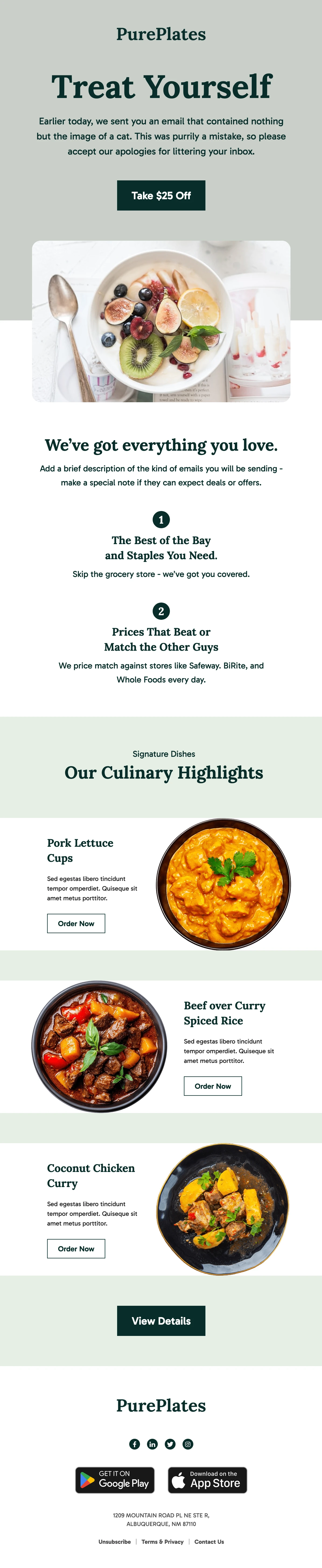
The sage-green design opens with a prominent offer and continues with food photography, restaurant benefits, and three featured dishes. The clear Order Now actions make it suitable for a delivery-focused adaptation of the special-offer example.
Before editing: The original preview includes a humorous apology and comparison claims. Rewrite those sections to fit your own brand and use only discounts or price comparisons you can substantiate.
3. Booking Confirmation Email Template for Hotels and Restaurants
Best for: Restaurant table-booking confirmations and guest reservation details.
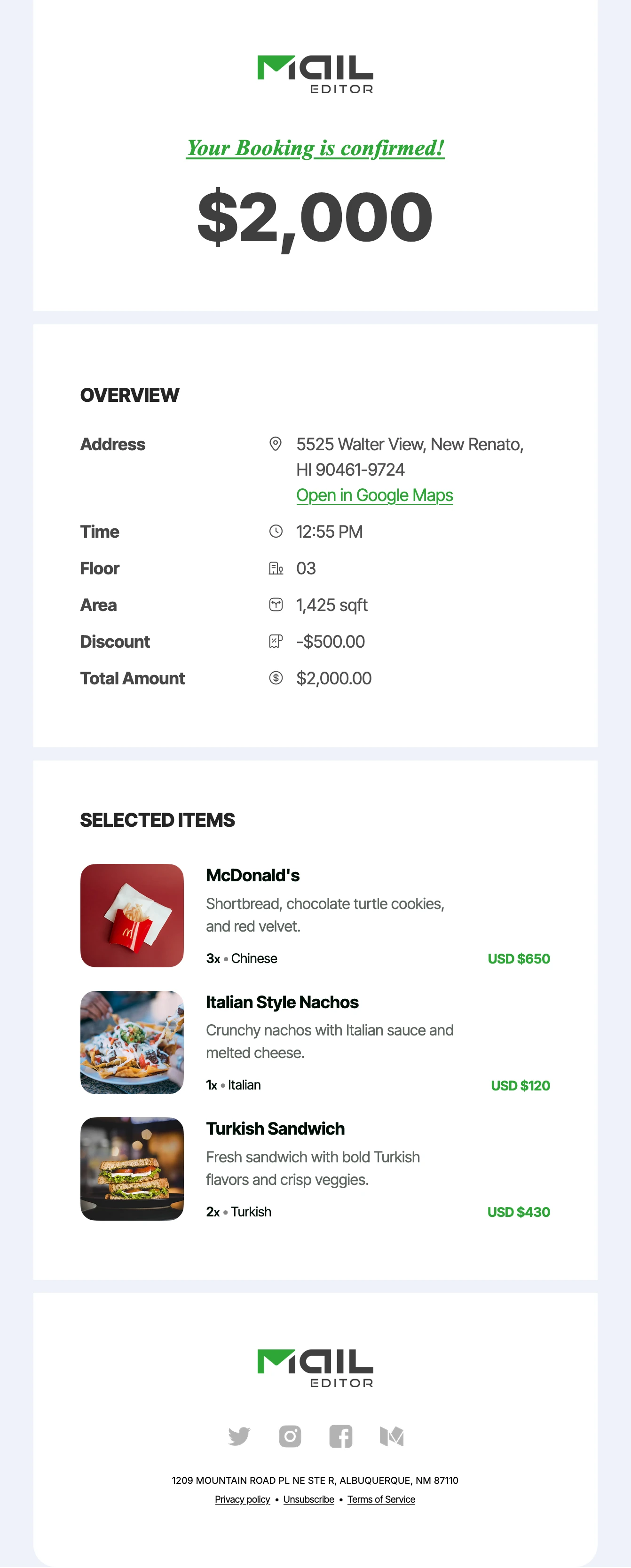
This confirmation layout combines a clear booking status, location and time overview, and structured item details. The original design is multi-industry, so restaurant teams should adapt it into a concise confirmation with reservation date, time, party size, address, and a modification or cancellation link.
Before editing: Remove irrelevant fields such as floor, square footage, and property-style pricing. Keep payment details only if an actual deposit or prepaid charge applies; replace the selected-items list with reservation-relevant information or remove it.
For more layouts beyond these three examples, browse the Restaurant Email Templates collection. This dedicated category is the best place to compare restaurant-specific designs before starting a new campaign.
How to Customize a Restaurant Email Template
With MailEditor’s email editor, you can adapt a restaurant layout rather than building the entire HTML message from scratch. Use this practical workflow:
- Choose a goal. Decide whether the message should drive a menu view, a food order, a reservation, or simply confirm a booking.
- Open the right template. Start with one of the three designs above or browse the Restaurant category.
- Replace every placeholder. Update the restaurant name, actual dishes, food photography, address, hours, booking details, and promotional terms.
- Connect the correct CTA. Link menu buttons to actual dishes and reservation buttons to a working booking or management page.
- Simplify the layout. Remove irrelevant sections, including app badges if you have no app and property-booking fields if you are confirming tables.
- Preview and test. Check mobile and desktop, click every CTA, verify personalization, and send a test through your actual email-sending workflow.
Want to create a restaurant email from a prompt? You can also use the MailEditor AI Email Template Builder to generate an editable restaurant email draft. Describe your restaurant, audience, campaign goal, preferred style, and CTA, then review the generated copy, images, offers, and links before sending.
For a detailed final review, follow the MailEditor email pre-send checklist.
Choose a restaurant-focused design, replace the sample content, and prepare a message guests can act on.
Browse Restaurant Templates →Open MailEditorRestaurant Email Template Best Practices
- Match the guest moment. Send a confirmed booking message after a booking, a birthday email to an eligible birthday segment, and an offer to the right marketing audience.
- Make promotional terms easy to find. Show actual dates, eligible items, exclusions, and the redemption method before recipients click.
- Keep booking emails operational. Put date, time, party size, location, reference number and change/cancel instructions near the top.
- Use real food imagery and clear labels. Show the actual dish, use descriptive alt text, and ensure guests can understand the offer if images are blocked.
- Use one primary CTA. Choose an action that accurately describes the destination: View Menu, Reserve a Table, or Manage Reservation.
- Keep subject and preheader complementary. Do not use the same copy in both; include a specific guest benefit or booking detail.
- Respect marketing preferences. Honor subscriptions and opt-outs. Promotional and purely transactional messages may have different requirements under applicable law.
- Test the delivered email. Confirm links, images, mobile spacing, sender details, booking data, and unsubscribe controls where required.
For U.S. campaigns, the FTC CAN-SPAM compliance guide explains how message purpose affects commercial and transactional requirements. Email rules differ by country and by how you use customer data.
Final Answer
The best restaurant email templates are the ones that match what a guest needs at that moment. Use welcome, offers, menu launches, birthdays, events, loyalty updates, feedback, and win-back emails for relevant marketing campaigns. Use separate booking confirmations and reminders when guests need accurate reservation details.
Start with any of the 10 copy-ready messages in this guide, personalize the subject, preheader, body and CTA, then adapt one of the three MailEditor layouts when you need a visual design. Browse MailEditor Restaurant Email Templates to explore editable options.
Frequently Asked Questions
Popular Blogs
Email Design2 mins to read
Top Email Template Builders & HTML Email Editors for 2026
Compare the best email template builders and HTML editors to design professional, responsive campaigns without coding.
Email Design9 mins to read
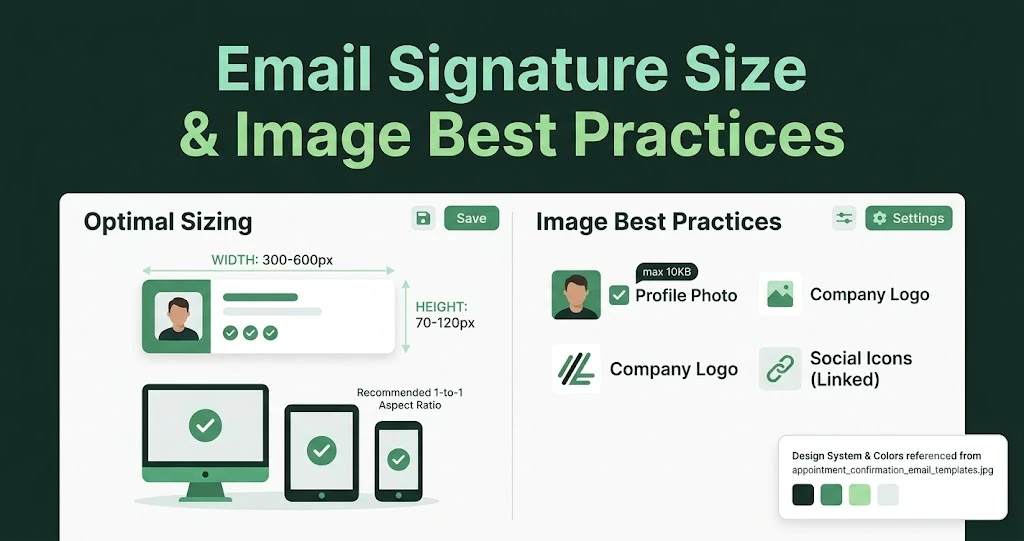
Email Signature Size and Image Best Practices
The ideal email signature is 320–600px wide and 90–200px high. Learn the best image sizes, formats, file limits, and mobile-friendly design tips.

Email Tips7 mins to read
Best Drag and Drop Email Editors in 2026
Discover the best drag and drop email editors in 2026. Compare top tools, features, templates, pricing, and automation to build stunning emails fast.
Marketing7 mins to read
4 Best Unlayer Alternatives to Design Emails
Looking for Unlayer alternatives? Explore the 4 best email design tools to create beautiful, responsive emails faster and easier.
Marketing6 mins to read
5 Beefree Alternatives to Upgrade Email Design Workflows
Looking for a better email design tool? Explore 5 Beefree alternatives that streamline workflows, improve collaboration, and elevate email campaigns.