Build vs Buy an Email Editor for SaaS: Costs & Trade-Offs
Build when email editing is core to your SaaS; buy or embed when speed matters. Compare development costs, maintenance, integration, and 3-year TCO.

Md. Yaikub Hossain Razon
Build vs buy an email editor is a product decision about where your SaaS team should spend engineering time, not simply a comparison between writing code and paying a software subscription. A custom editor offers ownership and deep control. An embedded editor can shorten implementation, but still requires integration, security checks, and ongoing testing.
This guide explains what an in-house drag-and-drop email editor actually requires, how to compare three-year costs, when each approach makes sense, and how to run a proof-of-concept before making a decision. It is written for SaaS founders, CTOs, product managers, and engineering teams evaluating an email editing feature within their own application.
Build vs Buy an Email Editor: The Short Answer
Build when the editor itself is strategic intellectual property, your workflow cannot be supported by an existing product, and your team has the capacity to maintain email-specific rendering and security over time. Buy or embed when customers mainly need a reliable way to create, customize, save, and export email content inside your platform, and your product advantage lies elsewhere.
Neither choice removes all engineering work. A purchased editor still needs authentication, user permissions, saved-template access, and a path to your sending infrastructure. An in-house editor needs all of that plus a visual editing engine and compatible HTML output.
A useful first question is: Would users choose our SaaS because we built the underlying email editor, or because of what they can accomplish with it? If the editing engine is not the differentiator, buying often deserves the first serious evaluation. If the editor is a core part of your product's competitive advantage, ownership may justify the investment.
What Does Building an Email Editor Actually Include?
A basic text box and a live preview are not a production-ready drag-and-drop email editor. The system must transform user actions into editable documents, then into email HTML that behaves acceptably across a range of inboxes. It must also recover work, keep customer data separated, and fit your SaaS product's permissions.
| Capability | What your team must deliver | Commonly overlooked detail |
|---|---|---|
| Visual editing | Text, images, buttons, layout blocks and drag-and-drop interactions | Undo/redo, selection states and mobile-friendly controls |
| Templates and modules | Reusable layouts, brand rules and content blocks | Versioning, locked sections and migration |
| Email HTML output | Responsive structure and exportable markup | Outlook behavior, fallback styles and dark-mode variations |
| Data and identity | Save, reopen and isolate customer designs | Tenant boundaries, authorization and secure image handling |
| Product integration | App navigation, editor state and downstream actions | Failures, retries, permissions and accessibility |
| Operations | Monitoring, bug fixes, testing and support | Regressions when browsers or email clients change |
The email-specific problem is larger than web design
A visual editor that produces attractive browser HTML is not necessarily generating dependable email HTML. Inbox clients do not interpret every HTML and CSS feature the same way. Outlook versions, Gmail, Apple Mail, mobile devices, dark mode, and image blocking can expose problems that are invisible in a normal web preview.
The Can I Email support tables document variations in HTML and CSS support, and Litmus's email QA guidance explains why checking actual email-client rendering remains necessary. Whether you build or buy, you still need a testing and acceptance process for your users' exported messages.
Decide what you mean by “editor” before estimating cost
Write down the minimum feature set before requesting a development estimate or vendor quote. An internal editor for a single branded newsletter might require only approved templates and simple text changes. A public SaaS editor with custom modules, multilingual campaigns, collaboration, tenant isolation, and many HTML export options is a substantially different project.
Your estimate should explicitly separate the editor UI, document and asset storage, email-safe rendering, and sending platform. The editor may create HTML without sending an email or maintaining subscriber lists. Treating all four as one product makes build-versus-buy estimates misleading.
Build vs Buy Email Editor: Side-by-Side Comparison
The decision is not about which option wins every row. It is about which constraints matter most in your product and what your team wants to own.
| Decision factor | Build in-house | Buy or embed |
|---|---|---|
| Time to first usable editor | Depends on team, scope and email QA | Can begin with an existing editor, then integrate |
| Interface control | Potentially complete, at ongoing development cost | Limited by provider APIs, settings and contract |
| Feature roadmap | You prioritize and ship all editor features | Provider roadmap influences editor capabilities |
| HTML rendering work | Your responsibility to generate and test | Vendor generates output; your team still validates |
| Security and tenancy | You implement the full data and permissions model | Shared responsibility; integration still matters |
| Recurring costs | Engineering, QA, hosting and support | License, usage, integration upkeep and support |
| Portability | You own source and data models | Check export rights and migration options carefully |
| Vendor dependency | Less third-party editor dependency | Provider uptime, policies and product evolution matter |
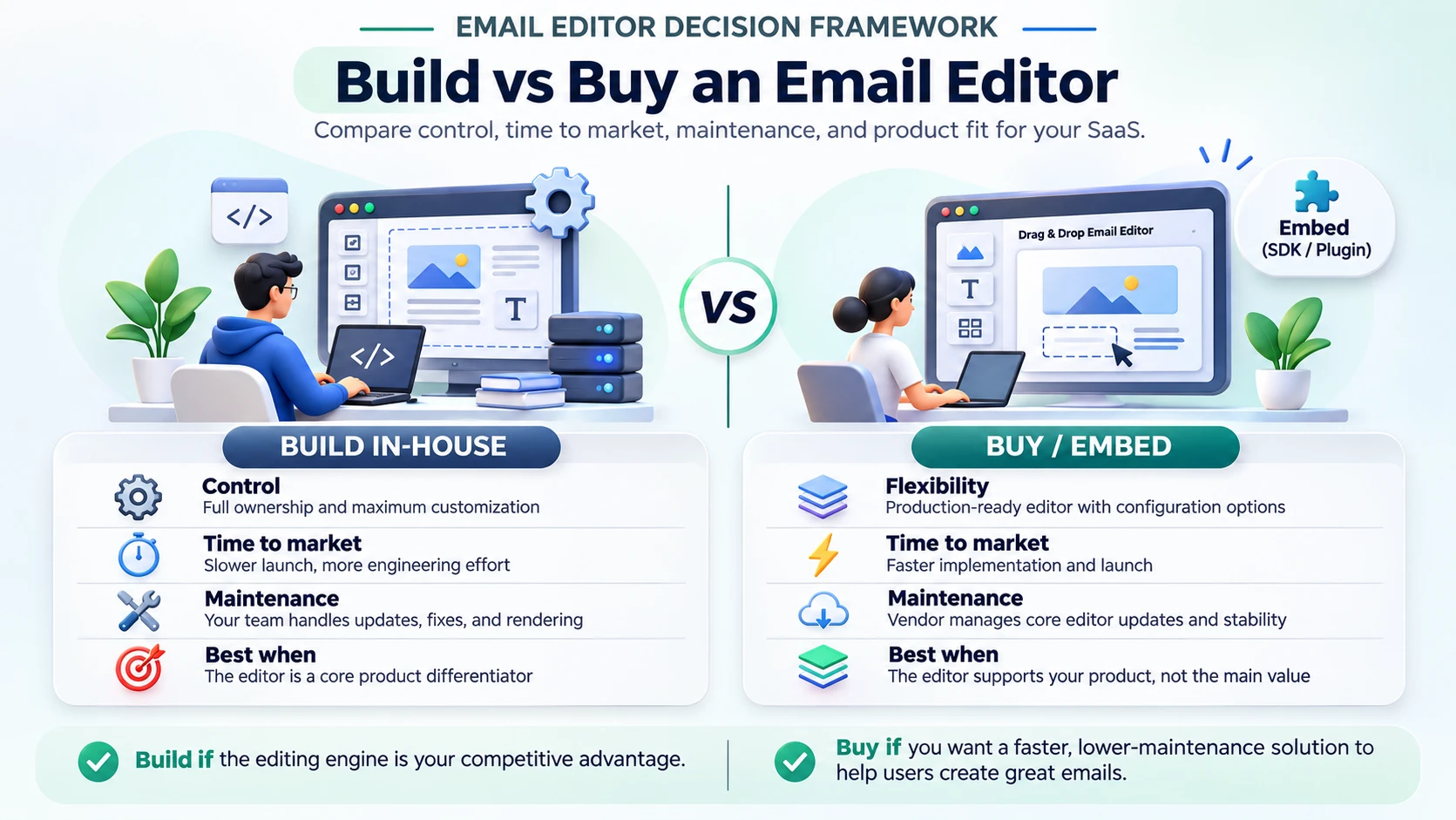
The clearest trade-off is ownership versus speed to a tested editing experience. Building gives your team the authority to change anything, but it also makes your team responsible for everything. Buying moves some editor-specific work to a provider while creating a dependency you must manage contractually and technically.
How Much Does It Cost to Build an Email Editor?
There is no trustworthy universal price for an email editor. The cost depends on your feature scope, engineer mix, QA requirements, infrastructure, accessibility standards, and how much existing code you can reuse. Treat any one-size-fits-all estimate as a starting assumption, not a quotation.
Instead, compare three-year total cost of ownership (TCO) for both options. Three years is a planning window, not a prediction about the lifespan of your product.
What belongs in the in-house build budget?
A complete build estimate should include discovery and product design, the editor canvas and block system, template serialization, responsive email output, authentication and authorization, image handling, testing, documentation, onboarding, and production support. Reserve capacity for ongoing bug fixes and changes after initial release.
There is also opportunity cost. Engineering hours spent on selection handles, HTML fallbacks, and template controls are hours not spent improving the features that make your SaaS different. You should account for that trade-off even if it does not appear on an invoice.
What belongs in the embedded editor budget?
An embedded editor's license is only one line. Add frontend and backend integration, authentication, identity mapping, API access, storage decisions, asset hosting, branding, legal review, QA, user support, and possible migration costs. Examine the commercial unit being billed: application, workspace, editor user, monthly active creator, API usage, or another measure.
Ask for quotes for the same customer count and feature set, and check whether production, staging, white-label capabilities, custom blocks, and support are included. The provider's standalone marketer plan may not be the same product or license as its embeddable SDK or plugin.
| Cost category | Build in-house | Buy or embed |
|---|---|---|
| Initial implementation | Product design, engineering and email renderer | Evaluation, integration and configuration |
| Ongoing product work | Features, refactoring and accessibility | Host-side changes and vendor release adaptation |
| Rendering QA | In-house test suite, fixes and retesting | Still required, even with vendor-generated HTML |
| Infrastructure and storage | Your environment and asset delivery | Your app plus vendor or optional storage charges |
| Support and risk | Your engineers own failures and patches | Shared boundaries and escalation requirements |
| Exit or migration | Internal refactoring and data evolution | Vendor replacement and data portability work |
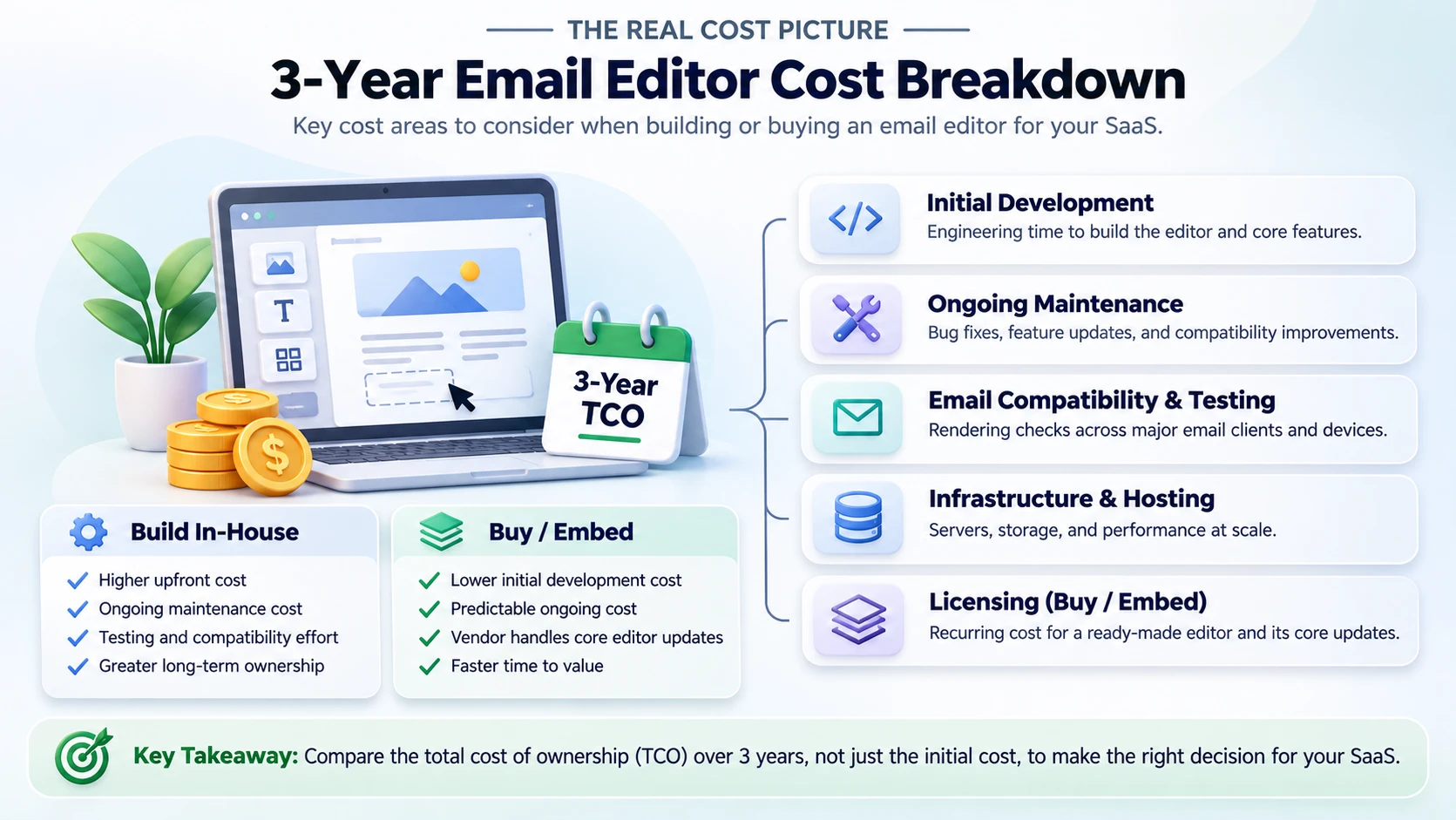
An illustrative calculation, not a market estimate
Suppose your internal planning assumptions are two developers, 12 weeks, 40 hours per week, and a $85 fully loaded hourly engineering cost. Initial engineering labor would be $81,600 (2 × 12 × 40 × $85). That is not a quote for a finished editor; it excludes design, testing, infrastructure, management, maintenance, and opportunity cost.
For an embed evaluation, suppose one developer spends four weeks at the same rate. That initial labor would be $13,600, plus the editor license, other implementation work, testing, and recurring expenses. These deliberately hypothetical scenarios illustrate the arithmetic; they are not vendor pricing, implementation promises, or evidence that one team will deliver either option in that time.
Your comparison becomes more useful when you replace the assumptions with estimates from your engineers and actual vendor quotes.
Use one formula for both options
Build TCO = Initial product development + ongoing engineering + QA + infrastructure + support + expected migration/refactoring costs.
Buy TCO = Initial integration + license and usage charges + ongoing integration maintenance + QA + support + expected migration costs.
For a fair comparison, use the same number of years, feature scope, expected editor users, environments, and support requirements. Keep best-case, expected-case, and high-cost scenarios rather than hiding uncertainty in one precise-looking number.
Hidden Costs That Change the Decision
The initial estimate rarely captures the entire ownership burden. Five areas deserve specific attention before you commit.
1. Email-client compatibility is continuous work
An email that previews correctly inside your app can still look different in an inbox. Test common layouts, images, backgrounds, buttons, responsive breakpoints, dark mode, plain-text fallbacks, and accessibility. When you own the renderer, you own compatibility fixes. When you license an editor, confirm which rendering issues the provider supports and which must be handled by your team.
2. Document formats and portability matter
Determine whether the editor saves HTML, structured design JSON, MJML, or another source format. Exported HTML may be portable for sending but not re-editable in a different visual tool. Before committing, test whether saved templates can be exported, stored, restored, and migrated without losing essential structure or brand controls.
3. SaaS tenant isolation is not optional
If your product serves multiple organizations, the editor must respect account boundaries. Test authentication, user roles, per-tenant templates, audit needs, private asset access, and what happens when a user switches accounts. Keep signing secrets and privileged API credentials on your backend.
4. Editing features create support obligations
Users will report broken layouts, missing images, unsaved changes, confusing selection behavior, and template inconsistencies. Someone must investigate those cases. In a build model, that may be your editor engineering team. In a buy model, the work may be split between your application support and the vendor's support process.
5. Delayed product work has a real cost
A custom editor might take priority over integrations, reporting, onboarding, billing, or the workflows customers actually purchased your SaaS to use. You do not need to assign a speculative revenue number to acknowledge the opportunity cost. Instead, ask which roadmap items would be delayed and how important they are to retention and acquisition.
When Building Your Own Email Editor Makes Sense
An in-house editor can be the better long-term decision when your differentiation depends on editing behavior a third-party provider cannot offer.
- The editing experience is your core product. You sell visual email-authoring capabilities rather than offering them as one supporting feature.
- You need unusual document behavior. Specialized components, deep product-specific interactions, or proprietary collaboration workflows do not fit supported SDK extension points.
- You have strict control requirements. Deployment, data processing, or audit constraints cannot be satisfied by the providers you have evaluated.
- You have sustained engineering capacity. The team can own future rendering bugs, security patches, new features, and documentation, not just build an initial demo.
- You have verified the economics. A well-scoped, measured TCO comparison shows that ownership is justified at your expected scale and product horizon.
Even then, building from scratch is only one option. Your developers may be able to extend an open-source editor, use a design system or HTML generator, or build only the narrow functionality that truly differentiates the product. Review license obligations and email output behavior before choosing that route.
When Buying or Embedding an Email Editor Makes Sense
An embedded editor is often the more practical choice when email creation supports a larger SaaS workflow, such as customer relationship management, appointment booking, recruitment, ecommerce, or campaign automation.
- Time-to-market matters. You want to offer email creation without first implementing a general-purpose drag-and-drop system.
- Standard editing needs are sufficient. Templates, brand customization, common content blocks, save/reopen and HTML export meet the use case.
- Your team has other priorities. The primary value of your product is the data, automation, customer journey, or workflow surrounding the email.
- You want to evaluate capabilities before committing. A proof-of-concept can reveal gaps in integrations, permissions and outputs before a contract is signed.
- A provider can cover editor maintenance. You still own your SaaS integration, but some ongoing editing-engine work can be handled by the vendor.
Buying is not always the lowest-cost route. Licensing can become expensive at scale, and some features or deployment conditions may not be available on your plan. Treat the provider as a long-term technical dependency, not just a widget you can paste into a page.
The Hybrid Option: Own the Workflow, Embed the Editor
Many SaaS products do not need to choose between building everything and outsourcing everything. A hybrid architecture lets your company own the business workflow and integrate an existing editor as one component.
Your application can own customer identity, tenant permissions, approvals, campaign metadata, subscriber or recipient data, send scheduling, analytics, and billing. The embedded editor can handle visual layout creation, template customization, and email HTML output. Your backend coordinates the handoff between the two.
This division is especially useful when emails must match product records. For example, a booking platform can supply stay details and recipient rules while an embedded editor provides branded email design. The platform still decides who receives the message and when.
For a technical explanation of the options available, read our Email Builder Plugin for SaaS guide and the Email Builder SDK guide. If you are choosing between vendors rather than architectures, the 7 embedded email builders comparison covers that separate decision.
How MailEditor Fits a Buy-or-Embed Strategy
MailEditor Plugin is an example of a hosted iframe approach. Instead of adding a client-side visual editor SDK to your frontend, the host application renders an editor iframe using the documented integration flow. MailEditor describes signed end-user identity and a Backend API for accessing users' saved templates.
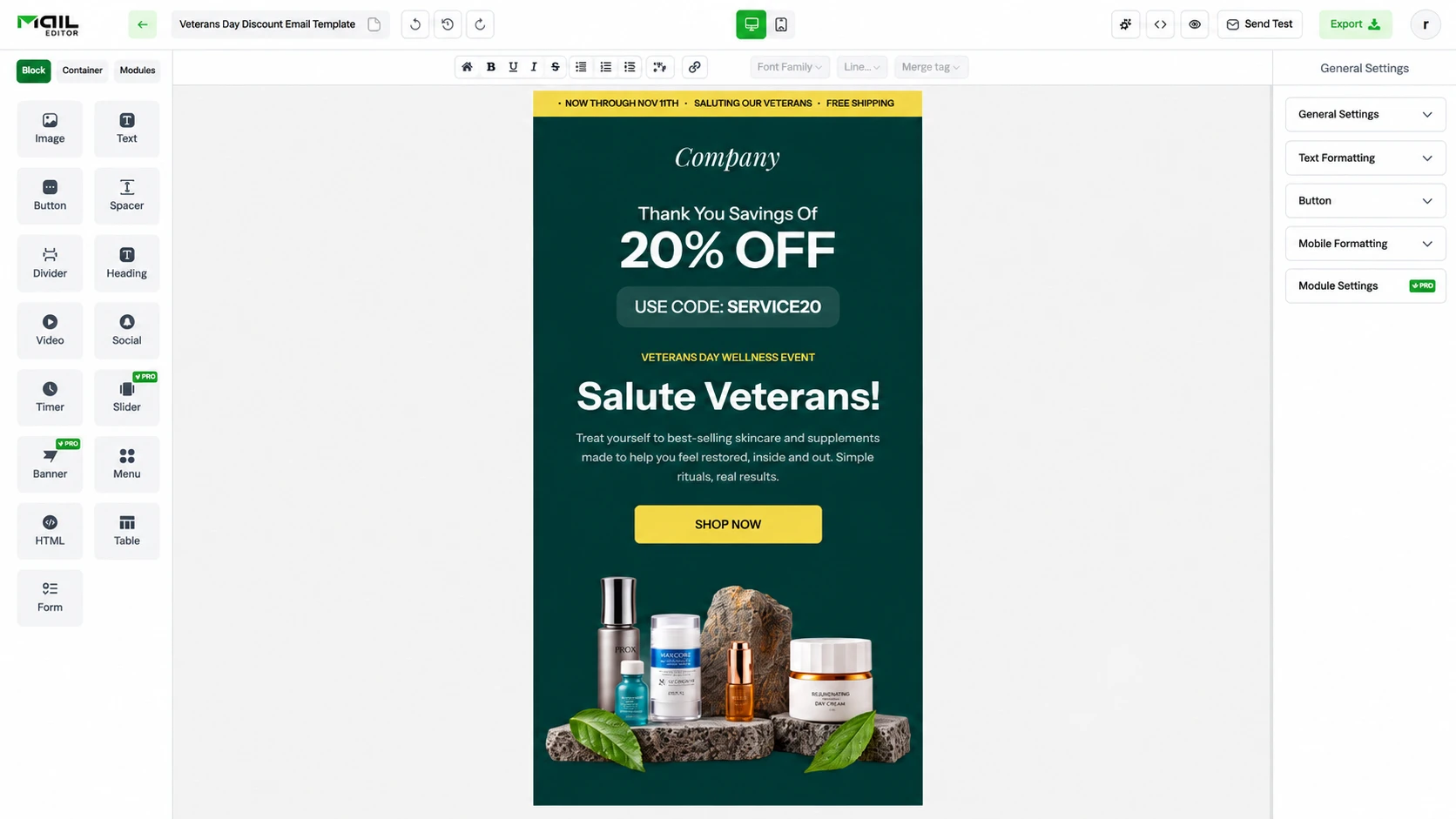
At a high level, the host team configures a plugin and allowed domains, signs the end user's identity on the server, embeds the editor view, and then retrieves saved template data using the Backend API. Your application remains responsible for its own sending infrastructure, authorization decisions, and workflow surrounding the email. This is a more specific implementation model than a generic promise to embed an editor with one line of code.
Where it may fit well: SaaS platforms that want users to create and save branded HTML emails inside the product, and prefer a hosted editing surface with server-side template retrieval.
What to validate first: MailEditor documents no client-side JavaScript SDK or host-facing iframe editor events as part of this plugin approach. If your frontend depends on granular live callbacks or deeply custom editor controls, confirm those needs early rather than assuming they are available. Also check current API limits, plans, allowed domains, and how your platform will consume the exported HTML.
The official plugin quickstart and Backend API documentation are the right starting points for an engineering proof-of-concept. MailEditor is one potential embed option, not a universal answer to the build-versus-buy decision.
Evaluating the embed path? Review MailEditor's plugin model and integration steps before deciding whether it meets your app's security, customization, and data requirements.
A Practical Build-vs-Buy Proof-of-Concept
Before selecting a provider or authorizing an internal build, ask both alternatives to meet the same acceptance criteria. This prevents the internal prototype from being judged on potential while a vendor is judged on production behavior, or vice versa.
- Define one realistic workflow. An authenticated user opens a saved company-branded template, edits a heading and image, saves, closes, and reopens it.
- Check tenant isolation. Confirm the same user cannot access another customer's templates or private assets.
- Test export and rendering. Export HTML, send it through your own sending system, and inspect it in relevant desktop and mobile email clients.
- Check customization. Restrict or unlock brand colors, fonts and reusable blocks according to the user role.
- Simulate failure. Disconnect the editor or API, retry a save, and verify the user sees a useful recovery path.
- Record actual cost. Capture engineer hours, vendor quote assumptions, hosting needs, QA effort, and support boundaries.
| Test area | Pass criterion | Evidence to collect |
|---|---|---|
| Authentication | Users enter only their own workspace | Test-user and tenant access logs |
| Save and reopen | Document state persists correctly | Before/after saved template comparison |
| HTML and email QA | Required layouts survive target inboxes | Previews and issue log by client |
| Branding and permissions | Restricted users cannot change protected elements | Role-based test recording |
| Integration reliability | Errors are recoverable and observable | Logs, retry behavior and support path |
| Cost and exit | Clear scope, quote and data export plan | 3-year TCO sheet and vendor terms |
Give both approaches a written pass/fail result. An editor can look polished yet fail your data model or event requirements; another may seem plain but satisfy the workflow at much lower implementation risk.
Common Build-vs-Buy Mistakes to Avoid
Comparing only launch costs. Include maintenance, QA, infrastructure, support, renewal terms, and exit costs. The cheapest demo is not always the least expensive production system.
Assuming “customizable” means unlimited control. Check precisely which user interface elements, blocks, APIs, events, and storage options can be customized under your intended plan.
Confusing an editor with an ESP. Design and export tools do not automatically manage recipients, consent, delivery, unsubscribes, or campaign analytics. Budget for those independently.
Trusting a browser preview as email QA. Send real HTML to the target inboxes and inspect rendering. This is necessary for both in-house and embedded editors.
Skipping exit planning. If you adopt a vendor, define what happens to HTML files, editable source documents, images, and reusable templates if your organization changes providers later.
Final Answer: Should Your SaaS Build or Buy an Email Editor?
Buy or embed an email editor when visual email creation is an important supporting feature, but not the product capability that makes your SaaS unique. You can often concentrate engineering effort on authentication, business workflows, customer data, and sending integration while relying on a provider for the visual editing experience.
Build when editor behavior is a core differentiator, available products cannot meet critical requirements, and your team is prepared to own rendering, testing, security, and long-term maintenance. A hybrid approach can be equally valid: keep proprietary workflow logic in your app while embedding an editor for common design tasks.
Make the decision using a documented feature scope, a consistent three-year TCO model, and a proof-of-concept with identical acceptance criteria. If a hosted iframe fits your direction, review the MailEditor Plugin and its integration documentation as one practical option to evaluate.
Frequently Asked Questions
Popular Blogs
Email Design2 mins to read
Top Email Template Builders & HTML Email Editors for 2026
Compare the best email template builders and HTML editors to design professional, responsive campaigns without coding.
Email Design9 mins to read
Email Signature Size and Image Best Practices
The ideal email signature is 320–600px wide and 90–200px high. Learn the best image sizes, formats, file limits, and mobile-friendly design tips.

Email Tips7 mins to read
Best Drag and Drop Email Editors in 2026
Discover the best drag and drop email editors in 2026. Compare top tools, features, templates, pricing, and automation to build stunning emails fast.
Marketing7 mins to read
4 Best Unlayer Alternatives to Design Emails
Looking for Unlayer alternatives? Explore the 4 best email design tools to create beautiful, responsive emails faster and easier.
Marketing6 mins to read
5 Beefree Alternatives to Upgrade Email Design Workflows
Looking for a better email design tool? Explore 5 Beefree alternatives that streamline workflows, improve collaboration, and elevate email campaigns.